
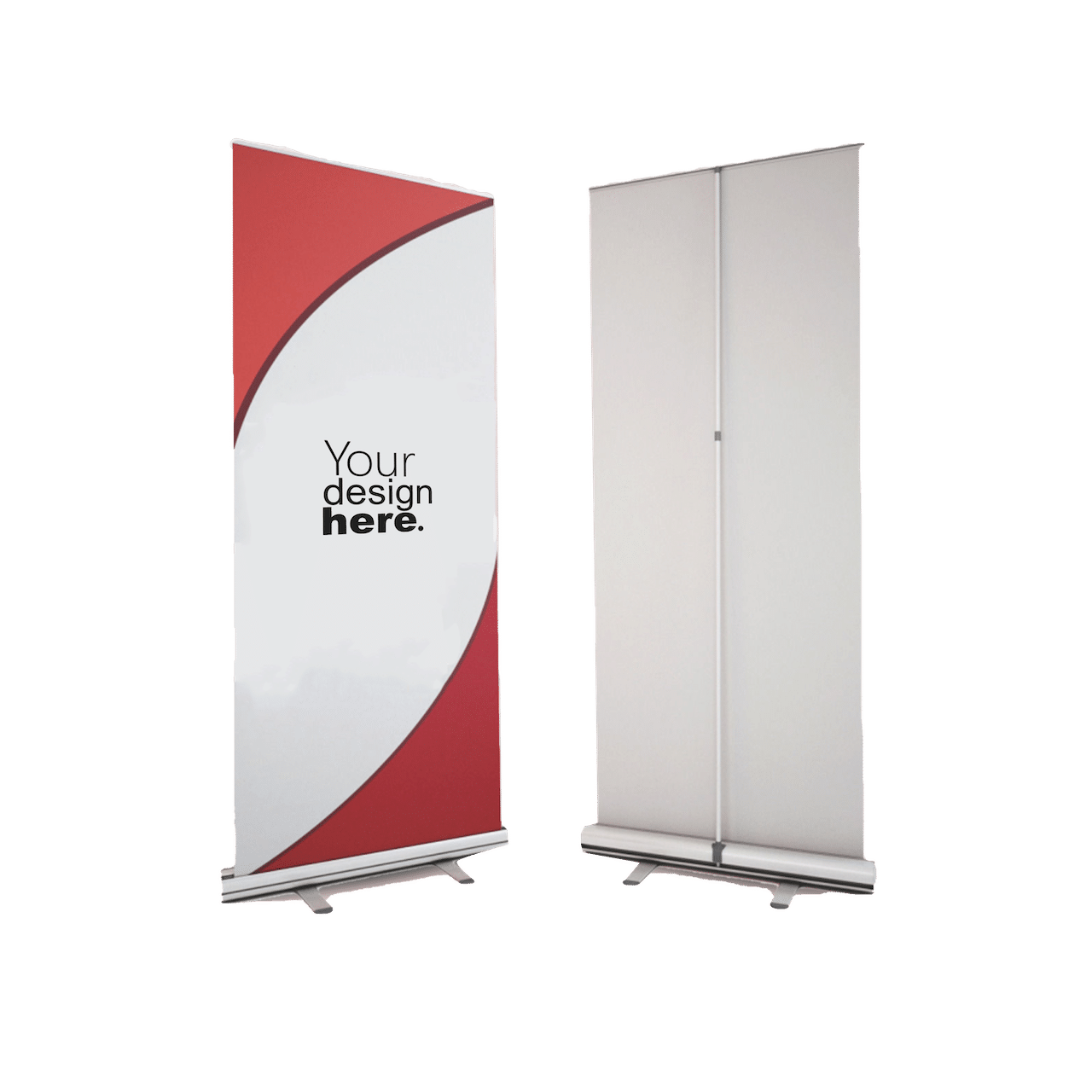
In the bustling commercial hubs of the United Arab Emirates—from the gleaming exhibition halls of the Dubai World Trade Centre to the high-footfall corridors of Yas Mall—visibility is the currency of success. For businesses, the challenge isn’t just being present; it’s being seen. Amidst the noise of digital ads and social media clutter, physical marketing assets remain a cornerstone of brand authority. Among these, the Roll-Up Banner (often called a pull-up stand or retractable banner) reigns supreme as the most versatile, portable, and cost-effective tool in a marketer’s arsenal.
But sourcing these banners can often be a headache of minimum order quantities (MOQs), confusing design specs, and long lead times from international shippers. Enter Merchlist, a UAE-homegrown platform that has digitized the merchandise supply chain. With a “print-on-demand” model, a user-friendly “Upload Your File” interface, and local production facilities in Dubai and Ajman, Merchlist has simplified the process of getting professional-grade signage.
This article is your definitive playbook for navigating the Merchlist platform to order custom roll-up banners. We will cover the strategic value of these banners, a step-by-step guide to the ordering process, technical design specifications to ensure a crisp print, and how to leverage Merchlist’s unique “No Minimum” service model.
Part 1: Why the Roll-Up Banner is Dubai’s Marketing MVP
Before diving into the “how,” it is crucial to understand the “why.” In a market as image-conscious as the UAE, a roll-up banner serves three specific functions that digital ads cannot replicate.
1. Vertical Real Estate
Human vision is naturally drawn to vertical structures in crowded horizontal spaces. A standard 85cm x 200cm banner provides nearly two square meters of branding that stands at eye level. In a crowded exhibition booth or a busy reception area, it acts as a visual anchor, signaling your location and professionalism instantly.
2. Portability for the Agile Business
The UAE business landscape is dynamic. You might be at a popup market in Al Serkal Avenue one day and a corporate seminar in DIFC the next. Roll-up banners are designed for this mobility. Weighing between 2kg and 5kg, they retract into a lightweight aluminum base and fit into a padded carry bag. They are the only large-format marketing tool that can be set up by a single person in under 60 seconds.
3. The “Silent Salesperson”
In retail environments or service centers, staff cannot greet every visitor immediately. A well-designed banner fills this gap. It answers the question “What do you do?” before a word is spoken. Whether highlighting a “Ramadan Special Offer” or listing your core services, the banner works passively to educate your potential customers.
Part 2: The Merchlist Advantage
While there are dozens of printing presses in Al Quoz and Mussafah, Merchlist distinguishes itself through a tech-first approach that caters to both modern startups and established enterprises.
No Minimum Order Quantities (MOQs)
This is the game-changer. Traditional industrial printers often require you to order in bulk to justify the setup costs. Merchlist’s digital infrastructure allows them to print a single banner.
- For Freelancers: A photographer can print one banner for a weekend wedding expo without breaking the bank.
- For SMEs: A cafe can test a specific promotion (e.g., “Summer Smoothies”) on one banner before rolling it out to all branches.
Local Production, Global Standards
Merchlist is not a drop-shipper. They operate their own production ecosystem with headquarters in Dubai Design District (d3) and a factory in Ajman Industrial Area.
- Speed: Local production means no customs delays. Orders are typically processed and shipped within days, not weeks.
- Quality Control: If a color looks off, their local team catches it. You aren’t dealing with a faceless factory overseas.
The “Upload Your File” Simplicity
Merchlist has removed the friction of endless email chains. Their platform is designed for a self-service experience where you upload your artwork, approve the specs, and pay—all in one session.
Part 3: Step-by-Step Guide to Ordering on Merchlist
Ready to order? Here is a detailed walkthrough of how to go from a digital file on your computer to a physical banner delivered to your office.
Step 1: Prepare Your Artwork (The Pre-Flight Check)
The “Upload Your File” feature is powerful, but it relies on you providing a high-quality source file. A banner printed from a low-quality file will look pixelated and unprofessional.
- File Format: PDF is the industry standard and the safest bet. It locks in your fonts and images. Merchlist also typically accepts AI (Adobe Illustrator) and high-res JPGs.
- Resolution: Ensure your design is at 150–300 DPI (Dots Per Inch) at full size. Unlike a business card, a 2-meter banner is forgiving, but anything below 150 DPI will look blurry.
- Color Mode: Set your design software to CMYK, not RGB. Screens display in RGB (light), but printers use CMYK (ink). Converting beforehand ensures the bright blue on your screen doesn’t print as a dull purple.
Step 2: Navigate to the Product Page
Visit the Merchlist website and navigate to the “Signs & Banners“ or “Display” category. Look for “Roll-Up Banner.”
- Select Size: The standard UAE size is 85cm x 200cm. This fits almost all standard booth spaces and retail corners. Wider options (100cm or 120cm) may be available for larger backdrops.
Step 3: The “Upload” Process
Click the “Customize” or “Upload Design” button.
- Drag and Drop: Pull your print-ready PDF onto the upload area.
- Visual Check: The tool will often show you a preview. Note: This is a digital approximation.
- Bleed Confirmation: Ensure your background color extends to the very edge of the upload zone. You don’t want thin white lines appearing on the edges of your finished product.
Step 4: Quantity and Checkout
- Bulk Discounts: While you can order one, check the pricing tiers. Merchlist often offers discounts for orders of 5, 10, or more units.
- Delivery Details: Enter your UAE location. Whether you are in a free zone in Jebel Ali or a residential villa in Springs, ensure you provide a mobile number for the courier.
Part 4: Designing for the Roll-Up Format
A roll-up banner is a unique format. It is tall, narrow, and the bottom is often obscured. To get the best results from your Merchlist order, follow these specific design rules.
1. The “Top-Down” Hierarchy
Nobody reads a banner from the bottom up.
- Top 30% (The Prime Real Estate): Your Logo and Main Headline must go here. This is what people see from across the room.
- Middle 40% (The Body): Key benefits, bullet points, or high-quality product imagery. Keep text minimal. “Less is more.”
- Bottom 30% (The Contact Zone): Website, QR code, and social handles.
2. The “Hidden Zone” (Crucial!)
The bottom of the banner graphic is attached to the spring mechanism inside the aluminum base.
- The Rule: Leave the bottom 5cm to 10cm of your design completely free of text or important logos. If you put a phone number at the very bottom edge, it might get sucked into the cassette or be cut off. Extend your background color into this area, but no text.
3. Typography and Readability
- Font Size: Main headers should be at least 72pt to 100pt. Body text should be no smaller than 24pt.
- Contrast: Use high-contrast color combinations. Dark text on a light background (or vice versa) is easiest to read. Avoid “vibrating colors” like bright red text on a bright green background.
4. Vector vs. Raster
- Logos: Always use Vector files (EPS, AI, SVG) for logos. Vectors use math to draw lines, meaning they can be scaled to the size of a building without losing quality.
- Photos: If you use photos, they must be high-resolution. Do not pull images from Google Images; they are usually too small and copyrighted. Use stock photography sites or your own professional photos.
Part 5: Material and Hardware Specs
When you order from Merchlist, you are buying a product designed for durability. Here is what you can typically expect in terms of specs:
The Media (The Banner Itself)
- Material: usually a PVC (Polyvinyl Chloride) or PP (Polypropylene) film.
- Grey-Backing: Premium roll-ups often feature a grey coating on the back of the material. This makes the banner opaque, preventing light from shining through and washing out your design—crucial for brightly lit venues like DWTC.
- Anti-Curl: High-quality media is treated to prevent the vertical edges from curling inward, a common sign of cheap printing.
The Hardware (The Base)
- Aluminum Cassette: Lightweight yet sturdy.
- Stabilizing Feet: Most standard banners have two swing-out feet on the bottom to prevent the banner from tipping over.
- Telescopic Pole: A segmented pole that slots into the base and holds the top rail.
Part 6: Strategic Use Cases in the UAE
How can you maximize the ROI of your Merchlist banner? Here are specific scenarios relevant to the local market.
1. The “Pop-Up” Market Stall
For vendors at Ripe Market or Dubai Flea Market:
- Usage: Place the banner at the corner of your table.
- Content: A high-res photo of your best-selling product and your price list. This filters customers; those who approach you are already interested in your pricing.
2. Corporate Reception
For offices in Business Bay or JLT:
- Usage: A permanent fixture next to the reception desk.
- Content: A “Welcome” message, safety protocols (still relevant in many sectors), or a QR code linking to a digital visitor registration system.
3. Event Wayfinding
For conferences or weddings:
- Usage: Use a series of 3-4 banners to create a path.
- Content: “Registration This Way,” “Buffet,” or “VIP Lounge.” It reduces the burden on your staff to constantly direct guests.
4. Video Calls and Webinars
- Usage: With remote work still prevalent, a roll-up banner makes an excellent, professional backdrop for Zoom/Teams calls.
- Content: A “Step and Repeat” pattern of your logo.
Part 7: Care and Maintenance
You’ve invested in a custom print; now ensure it lasts.
Setting Up:
- Place the base on the floor.
- Rotate the feet perpendicular to the base (90 degrees).
- Assemble the pole and insert it into the base hole.
- Stand behind the banner. Pull the graphic up smoothly.
- Hook the top rail onto the pole. Do not overstretch.
Taking Down (The Danger Zone):
- Unhook the top rail while supporting the pole.
- Do not let go. If you let the banner snap back into the base, you will damage the spring and possibly tear the edges of your print.
- Guide the banner slowly back into the cassette.
Cleaning:
- Use a soft, damp cloth with water only. Avoid harsh chemicals or alcohol, which can damage the UV ink.
Conclusion: Your Brand, Amplified
In the competitive arena of the UAE, a roll-up banner is more than just a piece of printed vinyl; it is a declaration of your brand’s existence. It stands tall when you are busy, speaks when you are silent, and travels wherever your business takes you.
By leveraging Merchlist’s seamless “upload and order” platform, you bypass the traditional friction of printing. You get the speed of local production, the flexibility of no minimums, and the assurance of quality. Whether you are a startup of one or a corporation of thousands, the power to professionalize your physical presence is now just a few clicks away.

 Best Sellers
 New Arrivals
 Tshirts & Polos
 Hoodies & Jackets
 Jerseys & Sportswear
 Uniforms & Workwear
 Bottles & Mugs
 Caps & Hats
 Bags
Bags Office
 Boxes & Packaging
 Travel & Tech
 Corporate Gifting
 Home & Wellness
 Printing Materials
 Eco-friendly
 Promotional Giveaways
 Pants & Shorts
 Pet Merch
 Kids
Kids School Spirit
 Stickers & Labels
 Business Cards
 Tradeshows & Exhibitions
 Food & Candy